
 EDU Education Network Email Registration Application
Introduction
在如今big data时代的浪潮中,运筹学进一步蓬勃发展,如何将大数据转化为最优决策成为其研究的重点课题。运筹学的应用场景是在满足约束条件下能够最大化、最小化单个或多个目标,从而得出最优决策。实现决策最优有两大关键步骤:建模,将问题通过数学形式准确有效地表达;求解,获得最优化目标函数的决策。在最优化目标函数求解过程中,很多实际问题受到大规模数据导致计算能力不足的影响,使得很好的模型不能发挥应有的实际效应。为了更好地解决求解问题,优化求解器(optimization solver)应运而生。目前,市面上知名的求解器有IBM旗下的CPLEX、FICO旗下的Xpress、Gurobi、MOSEK等。其中,丹麦MOSEK ApS公司开发的数学优化求解器MOSEK在求解二次规划、二阶锥和半正定规划等优化问题中,显示出强大的生命力。
MOSEK is a mathematical optimization solver developed by the Danish company MOSEK ApS for solving linear, mixed-integer linear, quadratic, mixed-integer quadratic, quadratically constrained, conic and convex nonlinear mathematical optimization problems. The applicability of the solver varies widely and it is commonly used to solve problems in areas such as engineering, finance and computer science. A special feature of the solver is its interior-point optimizer based on the so-called chi-square model.MOSEK's focus is on solving large-scale sparse problems, in particular linear, conic-quadratic (a.k.a. second-order conic programming), and semidefinite (a.k.a. semidefinite programming) interior-point optimizers, which are solved quite efficiently by the software.
Overall, MOSEK has the following technical advantages:
l Provide optimizationserver (computer)For remote optimization.
l Fully utilize the hardware features of multi-core processors forparallel computing.;
l The size of the problem that can be solved is limited only by the memory capacity of the computer;
l World-leading implementation of interior point methods for solving linear, second-order conic and quadratic programming problems;
l Provides programming interfaces based on Matrix and Fusion, including C, C++,Python,Java, C#, MATLAB, and R;
l Supports a variety of modeling environments, including commercial tools such as AMPL, GAMS and CVX, and open source tools such as CVXPY and JuMP;
l Supports multiple operating systems, includingWindows (computer),Linuxrespond in singingMacOS.;
MOSEK also has different commercial licenses for customers with various needs.
commercial price
https://www.mosek.com/sales/commercial-pricing/
The new prices are effective June 1, 2024 . Please see the bottom of the page for a description of the products and current offers.
| part number | Price (United States dollars) | Price (United States dollars) | Price/maintenance until May 31, 2024 |
| PTS | 2150 | 537.5 | 2050 / 512.50 |
| PTON | 1950 | 487.5 | 1850 / 462.50 |
| PTS-NODE | 8600 | 2150 | 8200 / 2050 |
| PTON-NODE | 7800 | 1950 | 7400 / 1850 |
PTS - Basic systems.Always necessary. It covers all MOSEK programming interfaces, including AMPL links, and provides the ability to solve the following problems:
- The linear problem.
- linear constraints and convex quadratic objectives.
- aforementionedMixed integer version.
PTON - Nonlinearity and conicity of PTSreach. It covers all remaining features and can be resolved:
- quadratic (quadratic, semidefinite, exponential, power cone) optimization problems.
- convex quadratic constraint problems.
- mixed integerQuadratic curves and quadratic constraint problems.
PTS-NODE,PTON-NODE - Node-locked version of the above (see server license below)
Educational Benefits
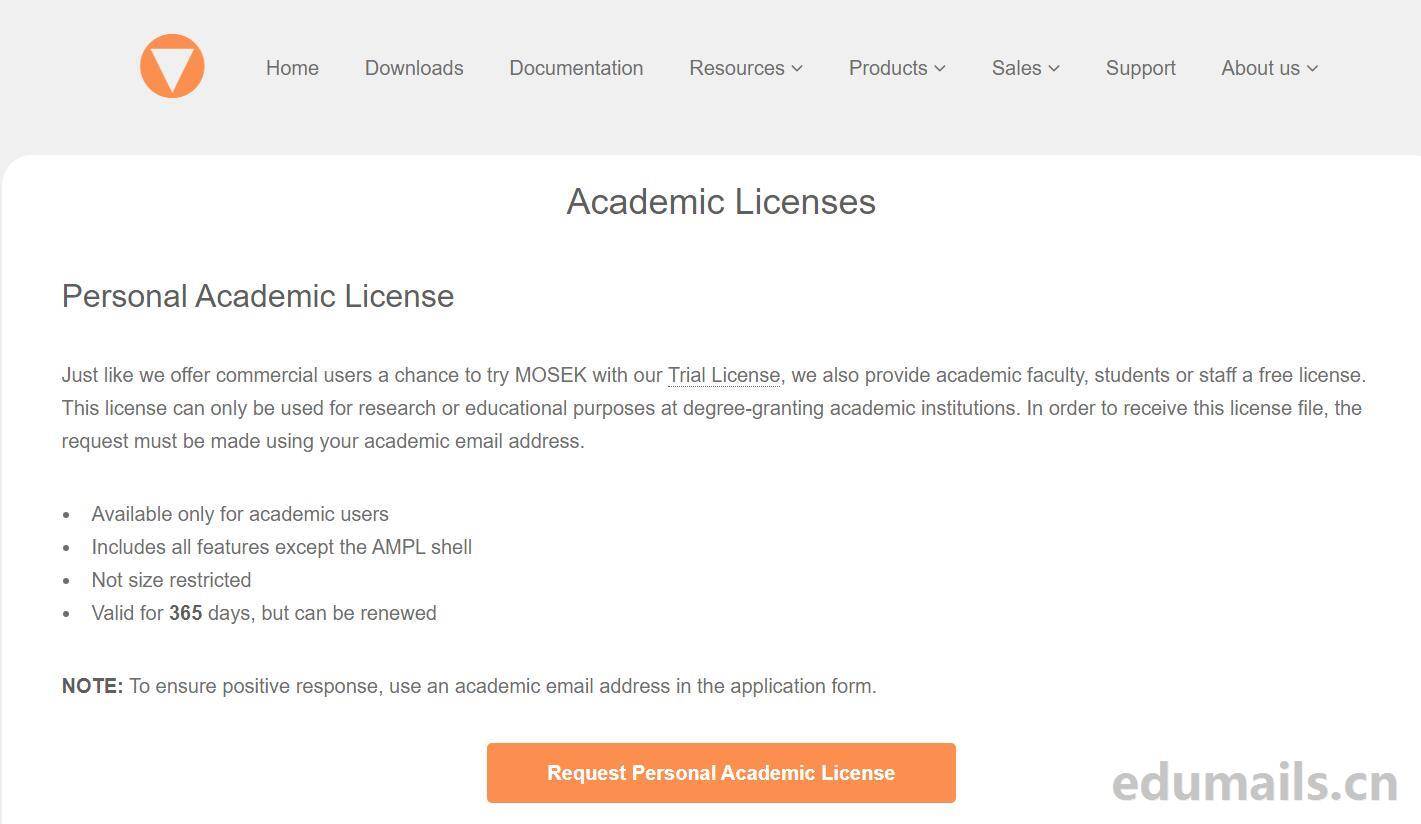
https://www.mosek.com/products/academic-licenses/
Personal Academic License Personal Academic License
Just like we offer commercial users a chance to try MOSEK with our Trial LicenseIn order to receive this license file, the request must be made using your academic email address. This license can only be used for research or educational purposes at degree- granting academic institutions. In order to receive this license file, the request must be made using your academic email address.
Just as we provide business users withUse of trial licensesAs with the opportunity to come and try MOSEK, we also offer a free license for academic faculty, students or staff. This license may only be used for research or educational purposes at the academic institution granting the degree. In order to receive this license file, a request must be made using your academic email address.
- Available only for academic users 只有适用于学术用户
- Includes all features except the AMPL shell Includes all features except the AMPL shell
- Not size restricted
- Valid for 365 days, but can be renewed valid for 365 days.Subscriptions can be renewed.
NOTE. To ensure positive response, use an academic email address in the application form.
NOTE: To ensure a positive response, please use an academic e-mail address on the application form.
Institutional Academic License
This is a floating license, which allows you to use several instances of MOSEK at the same time, through a License Server. It is designed specifically for universities, departments or university research groups The license is valid for two years and can be renewed any number of times through our website. Like the Personal Academic license, the request must be made using your academic email address. The license is valid for two years and can be renewed any number of times through our website. Like the Personal Academic license, the request must be made using your academic email address.
This is a floating license that allows you to use multiple instances of MOSEK at the same time through a license server. It is designed for universities, departments or university research groups at degree-granting institutions. The license is valid for two years and can be renewed any number of times through our website. As with personal academic licenses, requests must be made using your academic email address. To request one, please prepare the following information and visit the link below:
- Name, address and web address of your institution Name, address and web address of your institution
- Name and email of the primary contact (for example, head of the group)
- Number of licenses requested
- Hostname and hostid of the license server (see the licensing guide)Hostname and hostid of the license server (see the licensing guide)
- Alternative email address (typically the system administrator or whoever is going to maintain the service)
- A brief description of the intended use of MOSEKMOSEK A brief description of the intended use of MOSEKMOSEK
do not apply for an instantaneous licence if you do not need severe users' consentingly running matek in the same network.. Use a Personal Academic license instead. It is easier and faster to obtain.If you do not need multiple users running MOSEK on the same network at the same time, do not apply for an institutional license. Use a Personal Academic license instead. It is easier and faster to obtain.
Application Steps
We open the academic license introduction official website address https://www.mosek.com/products/academic-licenses/
Click "Request Personal Academic License" to go to the Personal Academic License application page:
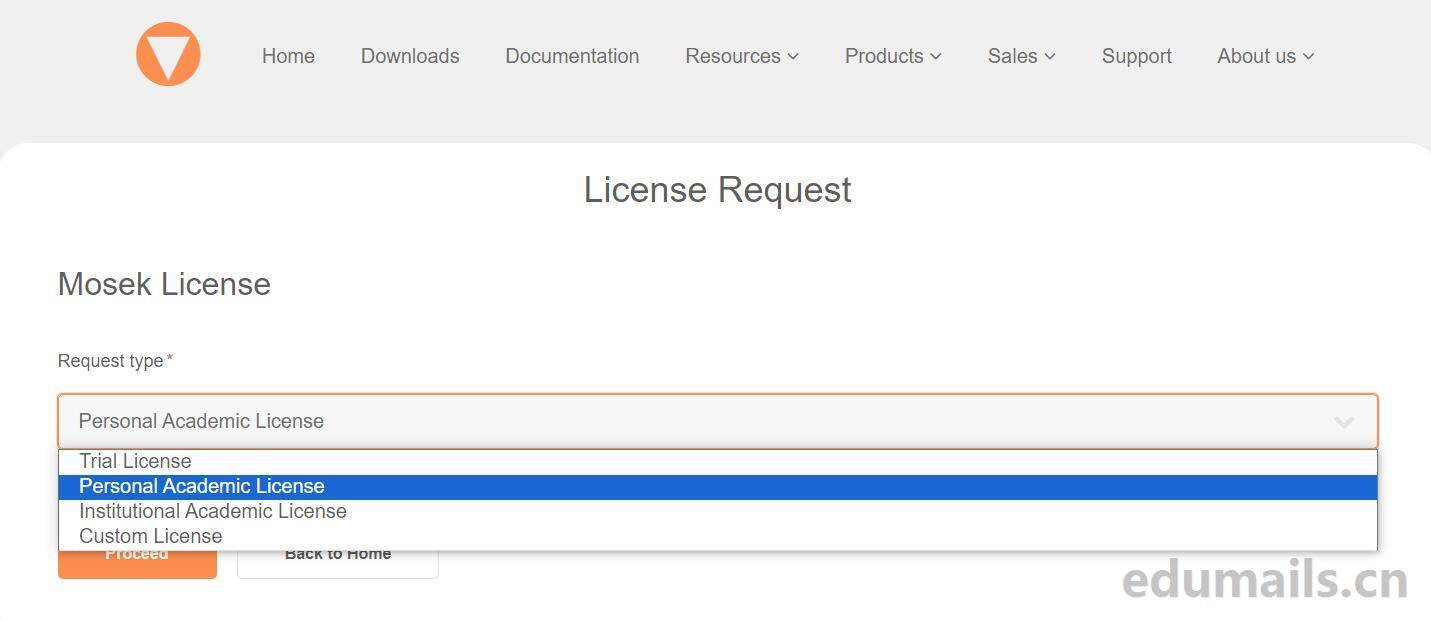
License Request , we select Personal Academic License Personal Academic License. Then click on Request as shown below:
Enter your name, E-mail Address*, and Organization as the full English name of your school.
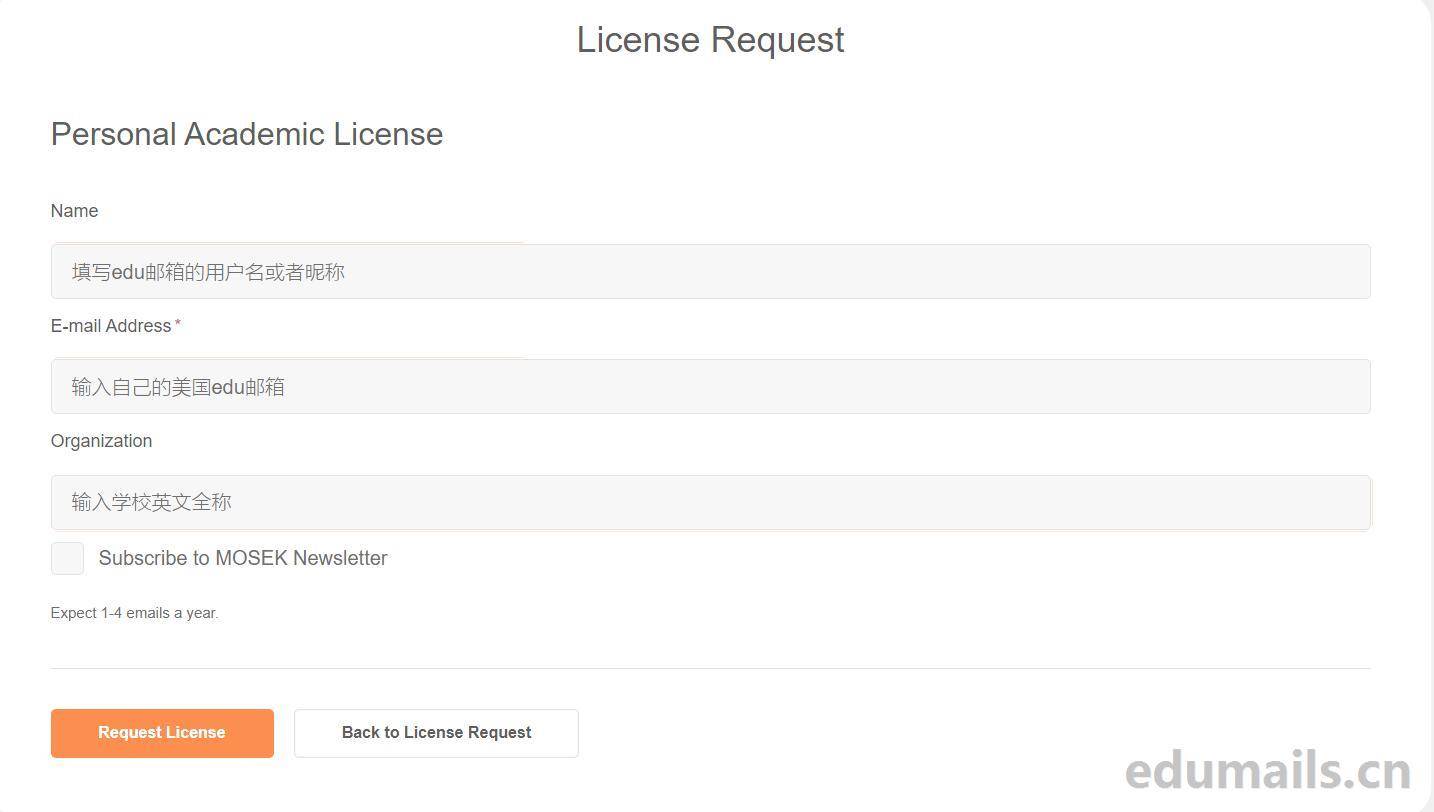
After we filled out these steps, we received an Academic License Agreement confirmation email to our foreign edu email address:
"MOSEK License Agreement for usage of Personal Academic License" MOSEK License Agreement for usage of Personal Academic License.
To use MOSEK, you must first accept our License Agreement. Use the link below to read and accept it.
View and Accept the MOSEK License Agreement
If you cannot use the link above, copy and paste the following URL into your browser. http://www.mosek.com/license/
request/license-agreement/?q= 3c79be6e To use MOSEK, you must first accept our license agreement. Use the link below to read and accept it. READ AND ACCEPT THE MOSEK LICENSE AGREEMENT If you are unable to use the link above, please copy and paste the following URL into your browser: http://w
We click on the confirmation link in the email, and it shows the agreement consent confirmation button: we click on the yellow button on the right to agree.

Successful application
After we click on Agree, the page will jump to the content as shown in the figure below to indicate the success of the license.
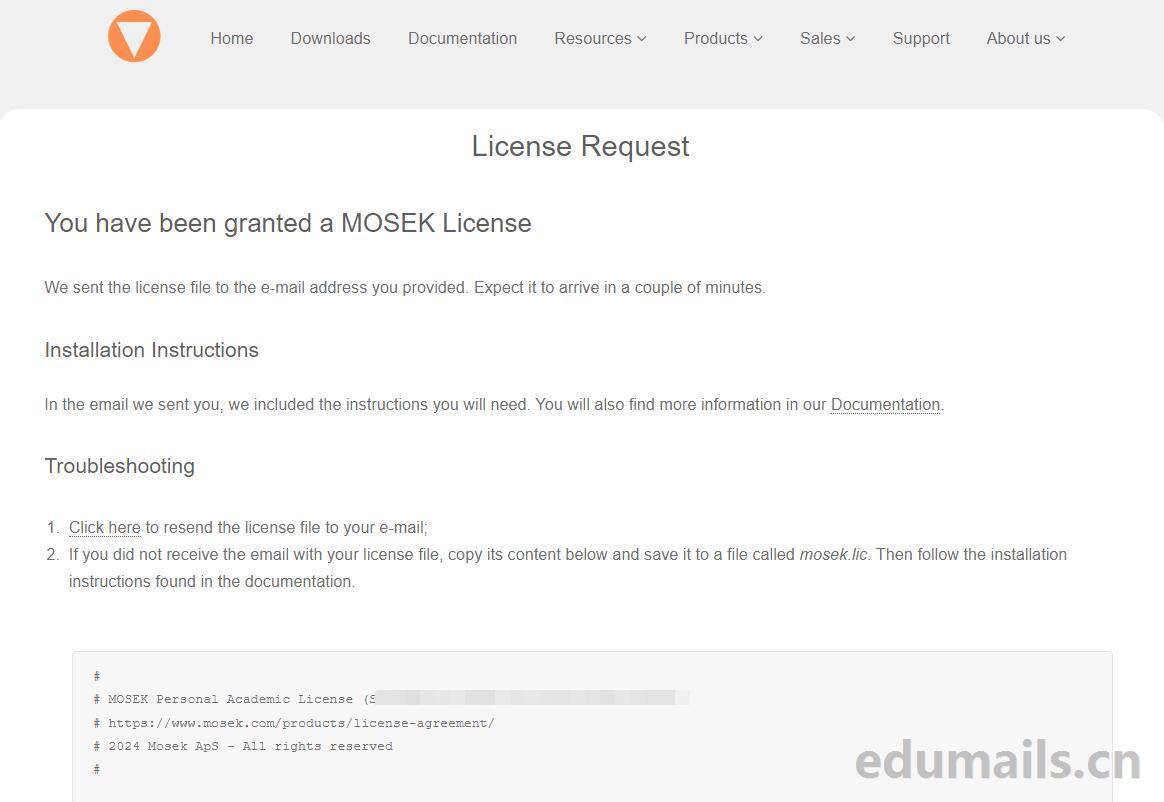
You have been granted a MOSEK License You have been granted a MOSEK License
We sent the license file to the e-mail address you provided. Expect it to arrive in a couple of minutes.
We send the license file to the email address you provide. Expect it to arrive within a few minutes.
Installation Instructions
In the email we sent you, we included the instructions you will need. You will also find more information in our Documentation. In the e-mail we send you, we include the instructions you need. You can also find them in our(computer) fileFind more information in.
Troubleshooting
- Click here to resend the license file to your e-mail;Click here to resend the license file to your e-mail;
- If you did not receive the email with your license file, copy its content below and save it to a file called mosek.lic. Then follow the installation instructions found in the documentation.If you did not receive an email containing the license file, copy the following and save it to a file named mosek.lic. Then follow the installation instructions found in the documentation.
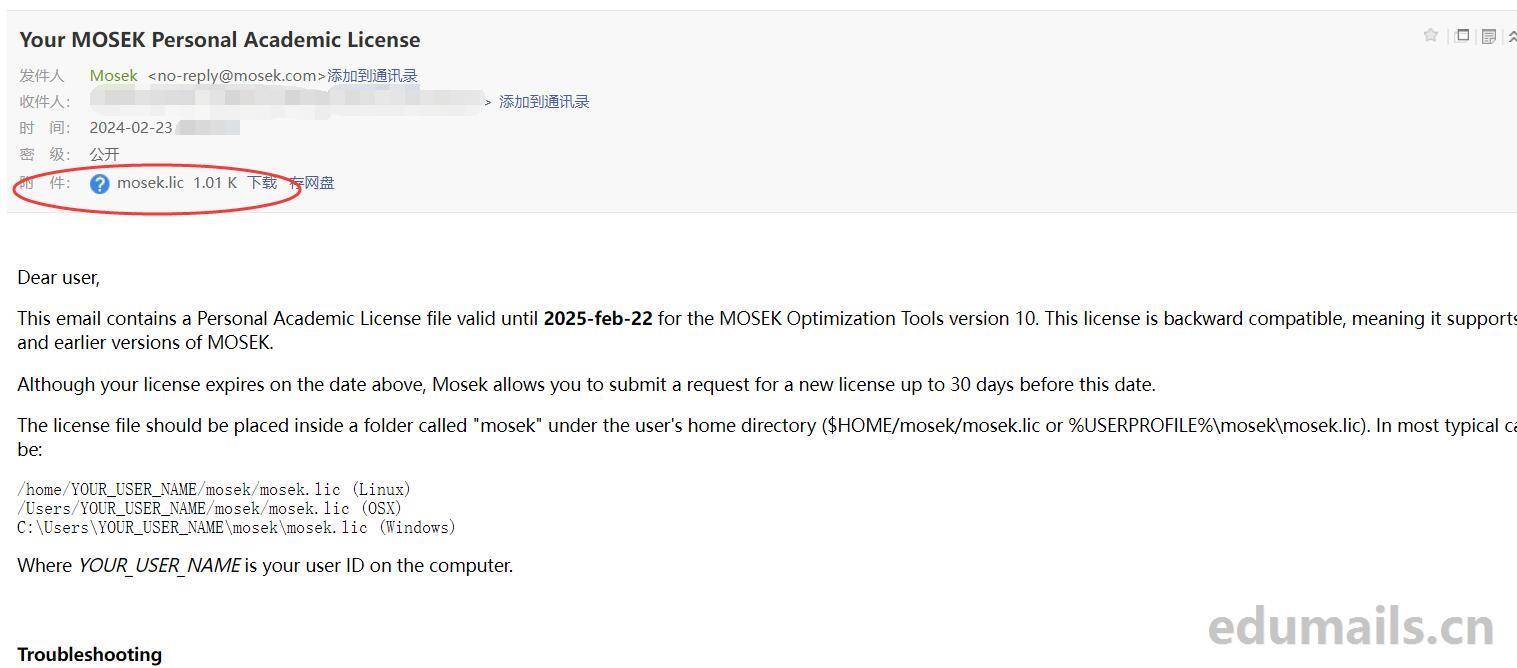
A second email with the license key attachment is sent to our edu mailbox.
Dear user.
This email contains a Personal Academic License file valid until 2025-feb-22 for the MOSEK Optimization Tools version 10. This license is backward compatible, meaning it supports both current and earlier versions of MOSEK.
Although your license expires on the date above, Mosek allows you to submit a request for a new license up to 30 days before this date.
The license file should be placed inside a folder called "mosek" under the user's home directory ($HOME/ mosek/mosek.lic or %USERPROFILE%\mosek\mosek.lic). In most typical cases that will be.
/home/YOUR_USER_NAME/mosek/mosek.lic (Linux)

/Users/YOUR_USER_NAME/mosek/mosek.lic (OSX)

C:\Users\YOUR_USER_NAME\mosek\mosek.lic (Windows)
Where YOUR_USER_NAME is your user ID on the computer.
Troubleshooting
In this section of our documentation you will find more advanced options for locating the license file. Running a license debugging tool, such as " msktestlic" in the command line or "mosekdiag" in MATLAB, can help you resolve issues with the license path.
These instructions assume the OS environment variable MOSEKLM_LICENSE_FILE has not If the variable was changed, it should point to the license file location.
If you are a MATLAB user, remember to restart MATLAB after updating an existing license file. If you used the manual installer on Windows, ensure the folder with MOSEK binaries ( .../bin) is in the environment variable PATH.
Remember to subscribe to our yearly MOSEK Newsletter and follow us on Twitter at mosektw.
Contact MOSEK Support at www.mosek.com/support in case you experience any problems.
This email contains a personal academic license file valid until February 22, 2025 for MOSEK Optimization Tool version 10. The license is backward compatible, which means that it supports both current and earlier versions of MOSEK.
Although your license will expire on the above date, Mosek allows you to submit a request for a new license up to 30 days prior to this date.
The license file should be placed in a folder named "mosek" in the user's home directory ($HOME/mosek/mosek.lic or %USERPROFILE%\mosek\mosek.lic). In most typical cases, this will be:
/home/your username/mosek/mosek.lic (Linux)
/Users/YOUR_USER_NAME/mosek/mosek.lic (OSX)
C:\Users\YOUR_USER_NAME\mosek\mosek.lic (Windows)
where YOUR_USER_NAME is your user ID on the computer.
fault resolution
In this section of our documentation you will find more advanced options for finding the license file. Running a license debugging tool (e.g. "msktestlic" on the command line or "mosekdiag" in MATLAB) can help you to solve license path problems.
These instructions assume that the operating system environment variable MOSEKLM_LICENSE_FILE has not been changed. If the variable has been changed, it should point to the license file location.
If you are a MATLAB user, remember to restart MATLAB after updating the existing license file. If you are using a manual installer on Windows, make sure that the folder containing the MOSEK binaries (.../bin) is located in the environment variable PATH.
Remember to subscribe to our annual MOSEK newsletter and follow us on Twitter at mosektw.
If you encounter any problems, please contact MOSEK support at www.mosek.com/support.

 ZH
ZH  EN
EN
online experience
群人数已满
人满了
群过期了
谁说的 还有的 刚弄好了
现在改了,只有一个月会员